

You know the routine. One tab for ChatGPT's writing, another for Claude's research, and a third for whatever Gemini's currently good at. Three logins, three invoices, and you're still copying and pasting between them like some medieval scribe by midnight. If this sounds too familiar, you're not alone. The real question isn't which AI model is best—it's why are we still paying for so many?
What Overchat Actually Does (And Why It's Different)
Overchat is simple: one login, every major AI model sitting in the same chat window. GPT-5.5, Claude Opus 4.8, Gemini 3.1 Pro, Grok, and DeepSeek, all accessible with a click. The genius is in the workflow—switch models mid-conversation, attach a PDF, have one model summarize it, then pass that summary to another and ask it to argue with the first. The whole thread stays intact. No exporting, no re-uploading, no "wait, which tab was I in?"
That's what an aggregator should do: let each model do what it's actually built for, instead of forcing one to cover its own blind spots.
The Tool I Keep Coming Back To: AI Image Combiner
Of everything inside Overchat (and yes, it packs over 100 tools, though like most of us, I stick to about six), the AI Image Combiner is the standout. Upload two photos, describe what you want—"put the person from image 1 onto the beach in image 2"—and in under 30 seconds, you get back a blended, watermark-free PNG that looks like it was shot that way. No obvious cutout paste job. No opening Photoshop for something you'll use exactly once.
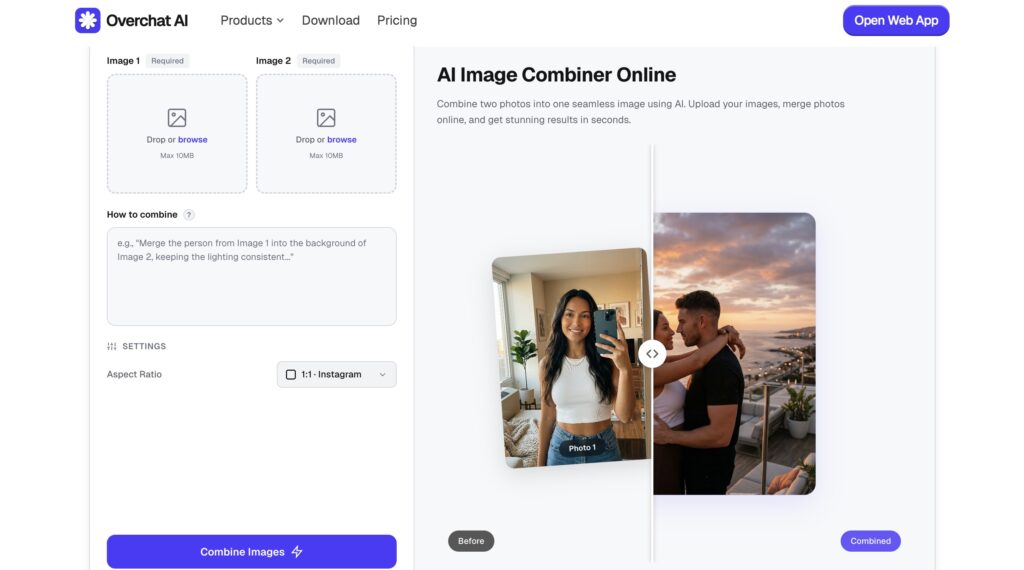
It accepts JPG, PNG, or WEBP up to 10MB each, and gives you five aspect ratio options depending on whether it's headed to a slide deck, a social post, or your portfolio. Whether you're creating a before-and-after case study or finally merging two colleagues into the same team photo (even if they've never actually met), this beats firing up a full editor. Fast. Clean. Done.
What Else Is Inside
Beyond the core chat and reasoning models, Overchat brings:
- AI image generator, image combiner, and photo editor (powered by Nano Banana, Flux, Seedream)
- Video generation with Sora, Kling, Veo, and Runway
- ChatPDF for document handling
- Built-in writer, summarizer, translator, and AI text detector
- Web, iOS, and Android apps
The Real Cost: $14.99/Month for Everything
The free tier gives you a daily message cap on basic models plus limited image generation—enough to poke around and decide if it fits your workflow. Pro unlocks unlimited chat, the full model lineup, and caps-free image and video generation for $14.99 a month or $59.99 yearly. If you've ever done the math on three separate subscriptions, the numbers speak for themselves.

Who Should Actually Consider This
If you only ever open ChatGPT and never touch another tool, this solves a problem you don't have. But if your week involves drafting copy, summarizing documents, turning ideas into visuals, and moving between all of it like a daily routine—Overchat cuts the friction. One place instead of a drawer full of single-purpose apps. One subscription instead of three.
I'm not rebuilding my entire workflow overnight. But I've stopped opening three separate tabs to do what one now handles, and the image combiner alone has saved me more hours than I expected. If writing, documents, and visuals all show up in your week, Overchat is the workspace that finally brings them together.
One place. Every model. Actually done.